VDRProsAI-driven virtual data room for secure corporate transactions Sign in Start free
The AI-driven virtual data room for secure corporate transactions

Stop paying per page. Start auditing per second.

VDRPros is built for M&A, divestitures, fundraising, and high-stakes document review. It reads, OCRs, and seals your deal files locally in the browser during the first pass, then builds the index, flags the risks with exact citations, and drafts the diligence report. Nothing leaves your browser until you decide the files are clean.

14-day free trial. No credit card required. First-pass review runs locally in your browser.

DEAL FILES IN

Rooms, folders, ZIPs. Any format.

PDFDOCXPPTXLSEMLMSGTXT

READ & NORMALIZE

Extract, OCR, de-duplicate, structure.

HASH & SEAL

SHA-256 seal on every file at intake.

AUDIT & VALIDATE

Structural defects, gaps, and integrity checks.

EVIDENTIARY INDEX

Sorted by content, with confidence scores.

DILIGENCE REPORT

Red flags with exact passages and citations. Drafted.

Local first pass

Read and seal files in your browser during initial review.

Tamper-evident by design

Hash-sealed at intake. Re-verify any file, any time.

Agentic diligence

Autonomous, explainable, repeatable.

Jurisdiction-aware

Compliance references matched to your workspace.

Every step receipted

Chain of custody you can export.

IngestCollect from anywhere
NormalizeExtract, OCR, dedupe
SealHash every file at intake
IndexYour categories, built for you
ReportDrafted, with cited passages
ShareExported report and seals, on your terms

Three stages. Every one leaves a receipt.

The engine does the mechanical part of diligence: the reading, the sorting, the defect-hunting. It stops exactly where judgment begins.

1

Ingest & seal, locally

Drop in data rooms, folders, or ZIPs. During the first pass, files are read, OCRed, and de-duplicated in your browser, with live progress as the set loads. Every file gets a SHA-256 seal at intake, printed in the report appendix and re-verifiable later.

2

Classify & flag

Documents are sorted by content, not filename, each with a visible confidence score. Red flags quote the exact passage, file, and page, and every finding carries a signed receipt. Anything uncertain goes to quarantine for a person to triage, never into a guess.

3

Report & share

You get a drafted diligence report organized by category: an integrity check, a short risk narrative, and prioritized actions with owners. The receipts log classifies every intake action with its reason and hash. When you are ready to share, the report, evidentiary index, and seal appendix export cleanly.

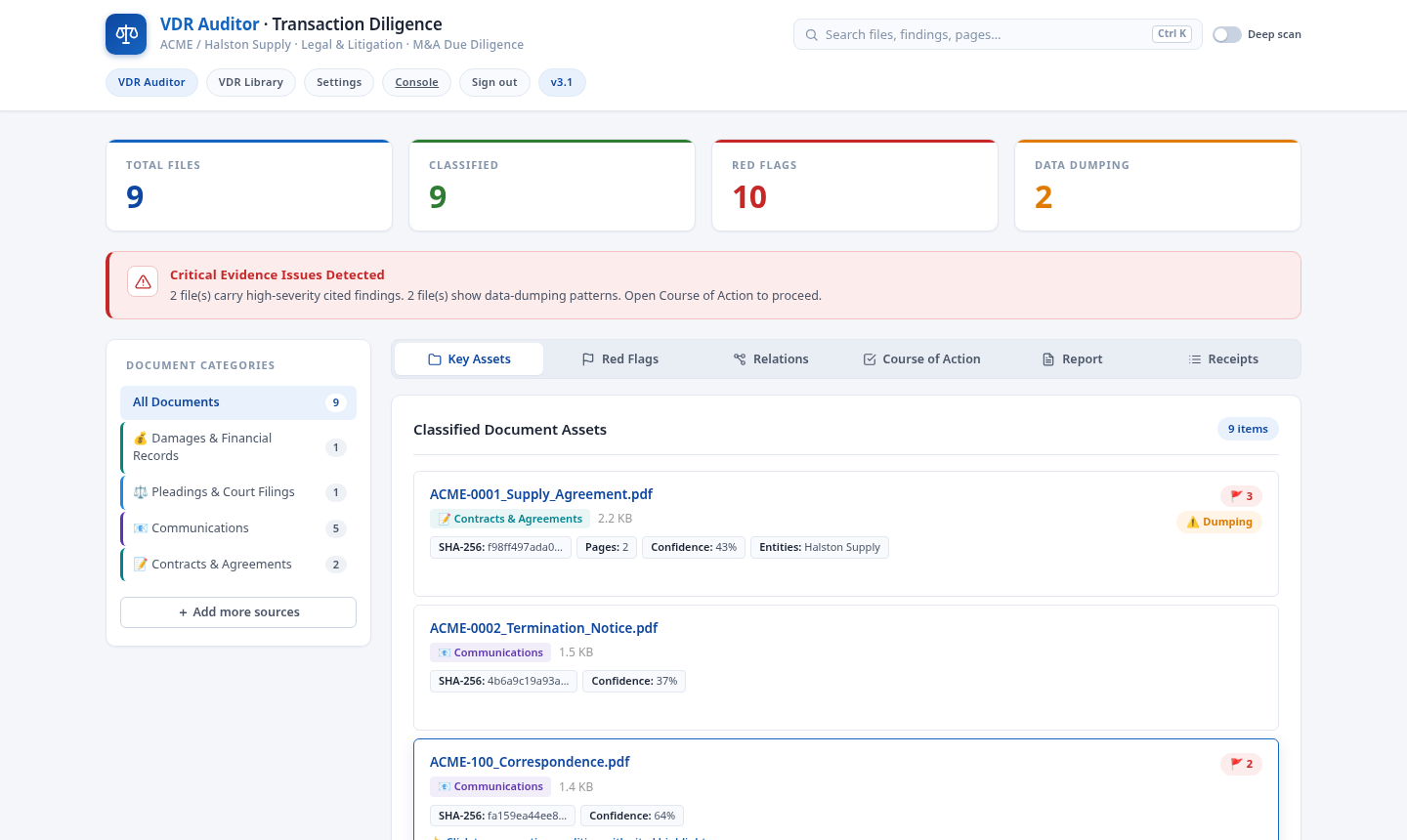
VDRPros audit dashboard with files classified by category, each carrying a SHA-256 seal
Intake classifies and hashes every file into a live audit dashboard.
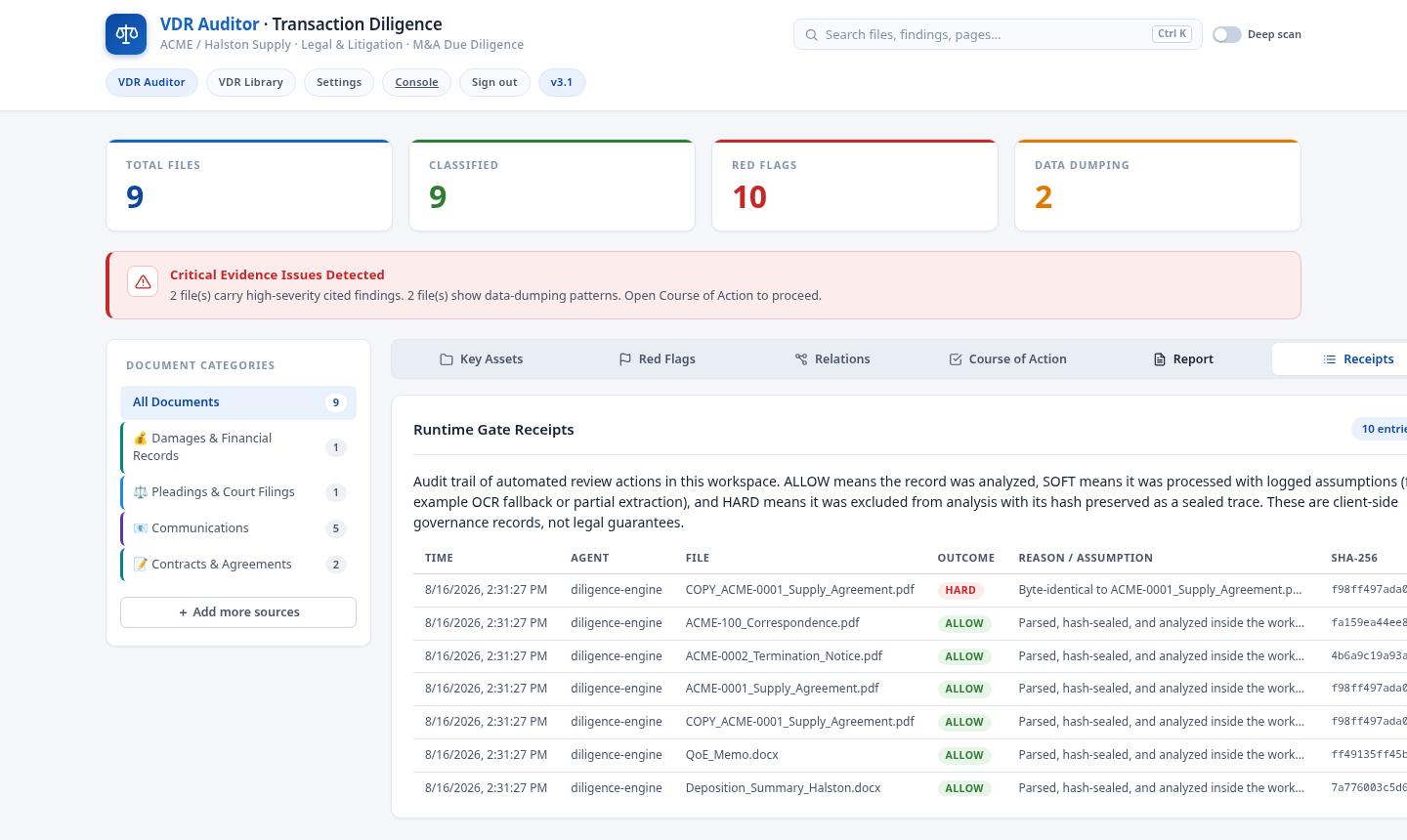
Runtime receipts log listing each intake action with its outcome, reason, and file hash
Every intake action is logged with an ALLOW, SOFT, or HARD outcome.

Evidence in context.

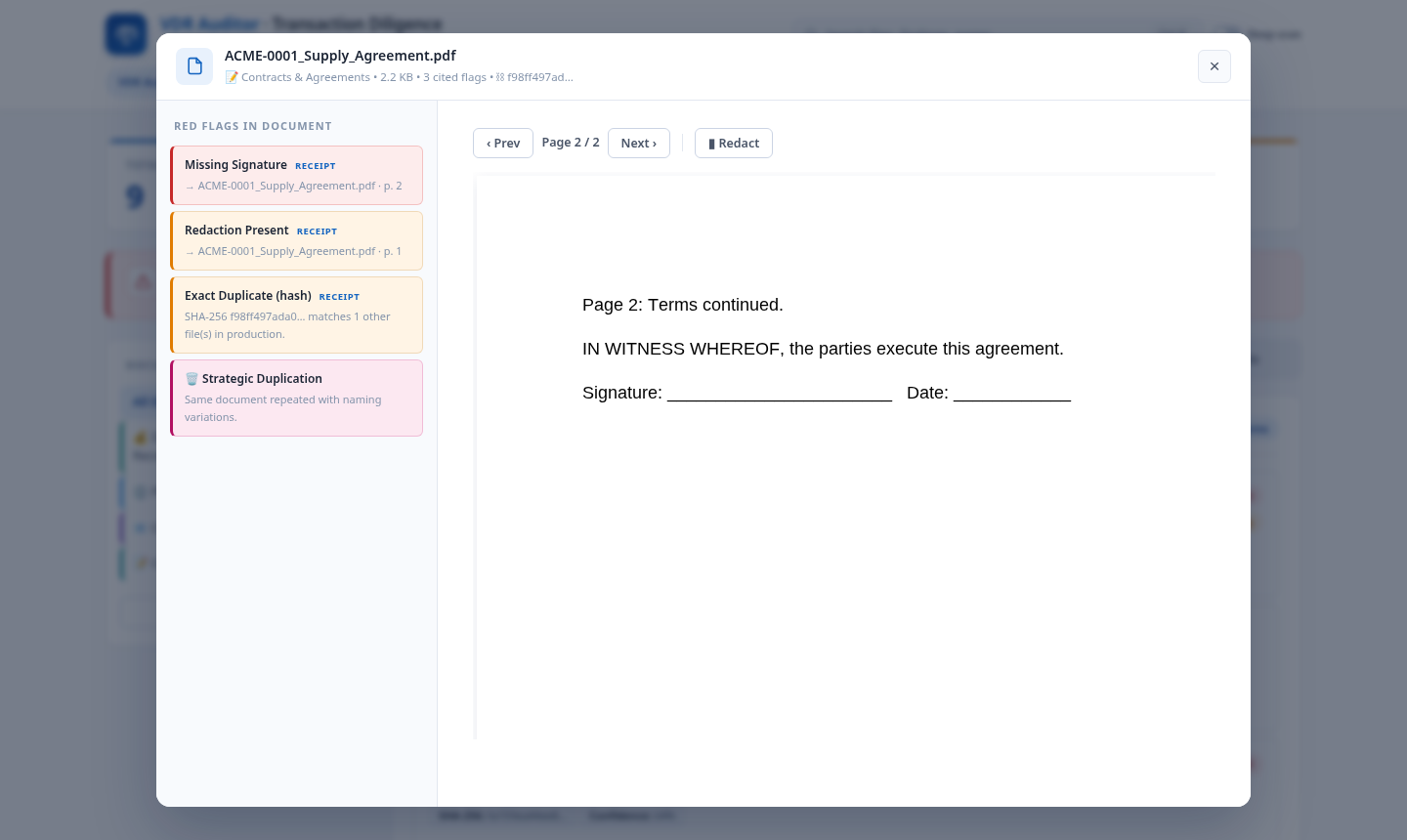
A finding you cannot verify is a finding you cannot use. Every flag quotes the passage that triggered it, with the file, page, and character offset.

Change-of-control clausesMissing signatures Undated amendmentsFigures that do not foot Duplicate documentsExpired permits Unredacted PIIPage gaps
Document viewer showing a red flag finding with the cited passage, file, page, and hash
Every finding cites the file, page, and hash in the document viewer.
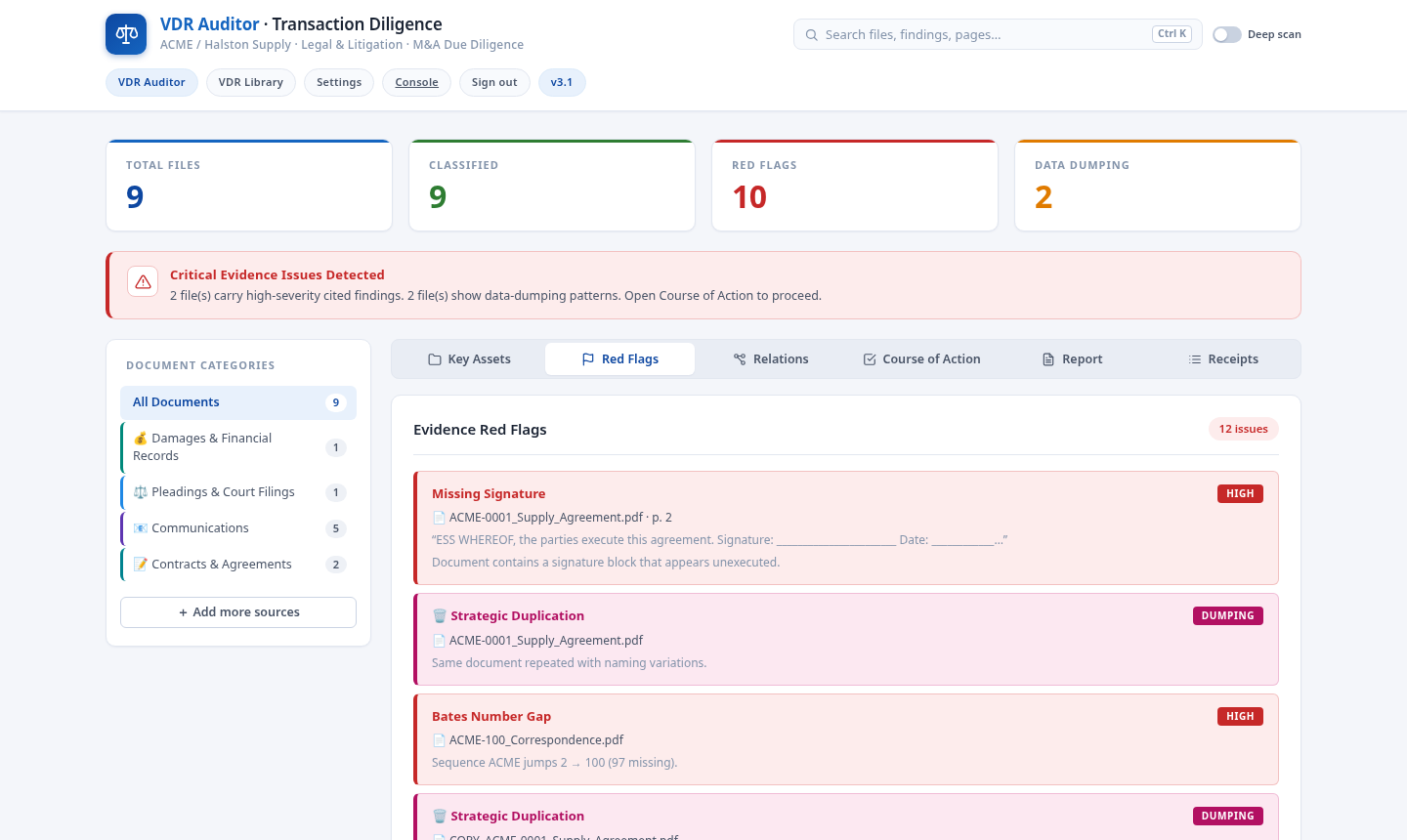
Evidence red flags grouped by file with severity tags and quoted passages
Red flags are grouped by file with severity and quoted passages.
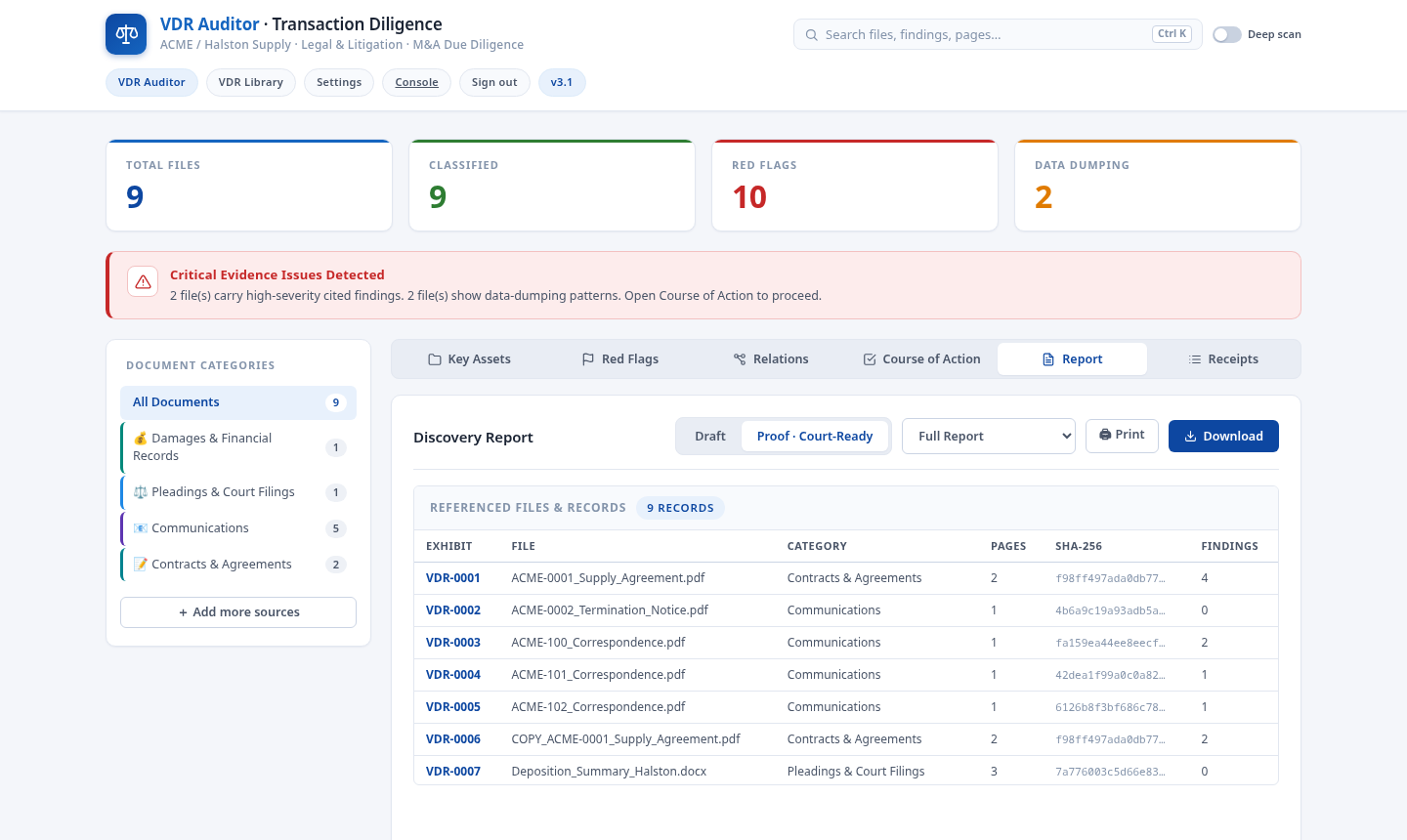
Proof report listing exhibits with SHA-256 seals and findings counts per category
The proof report lists exhibits with SHA-256 and findings counts.
The evidentiary index

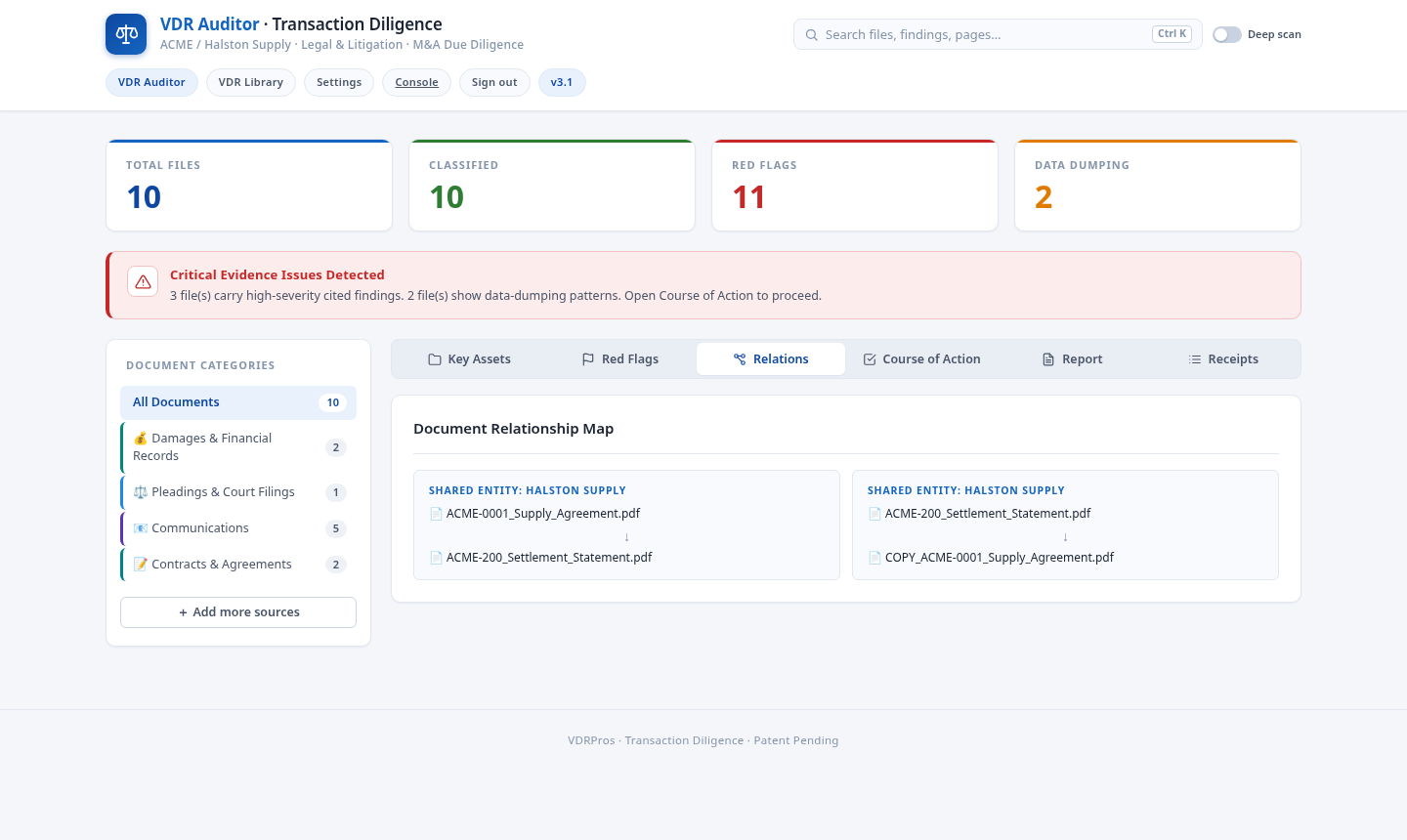
The index sorts documents by content into the categories a deal team expects. Litigation and eDiscovery matters run on the same engine. Edit it to fit your deal.

01 · Financial & tax records
Statements that do not foot, duplicate line items, missing schedules, stale audits.
02 · Corporate & governance
Charters, minutes, cap tables, approvals; unsigned consents and missing resolutions.
03 · Contracts & customers
Change-of-control language, unsigned instruments, undated amendments, expired terms.
04 · HR & employment
Missing agreements, unsigned offer letters, policy and handbook gaps.
05 · IP & technology
Assignments, licenses, unsigned declarations, gaps in chain of title.
06 · Legal, compliance & litigation
Regulatory filings, pleadings, privilege candidates, production defects.

Ten capabilities, each leaving a record.

The details below are how the workspace proves its work at scale.

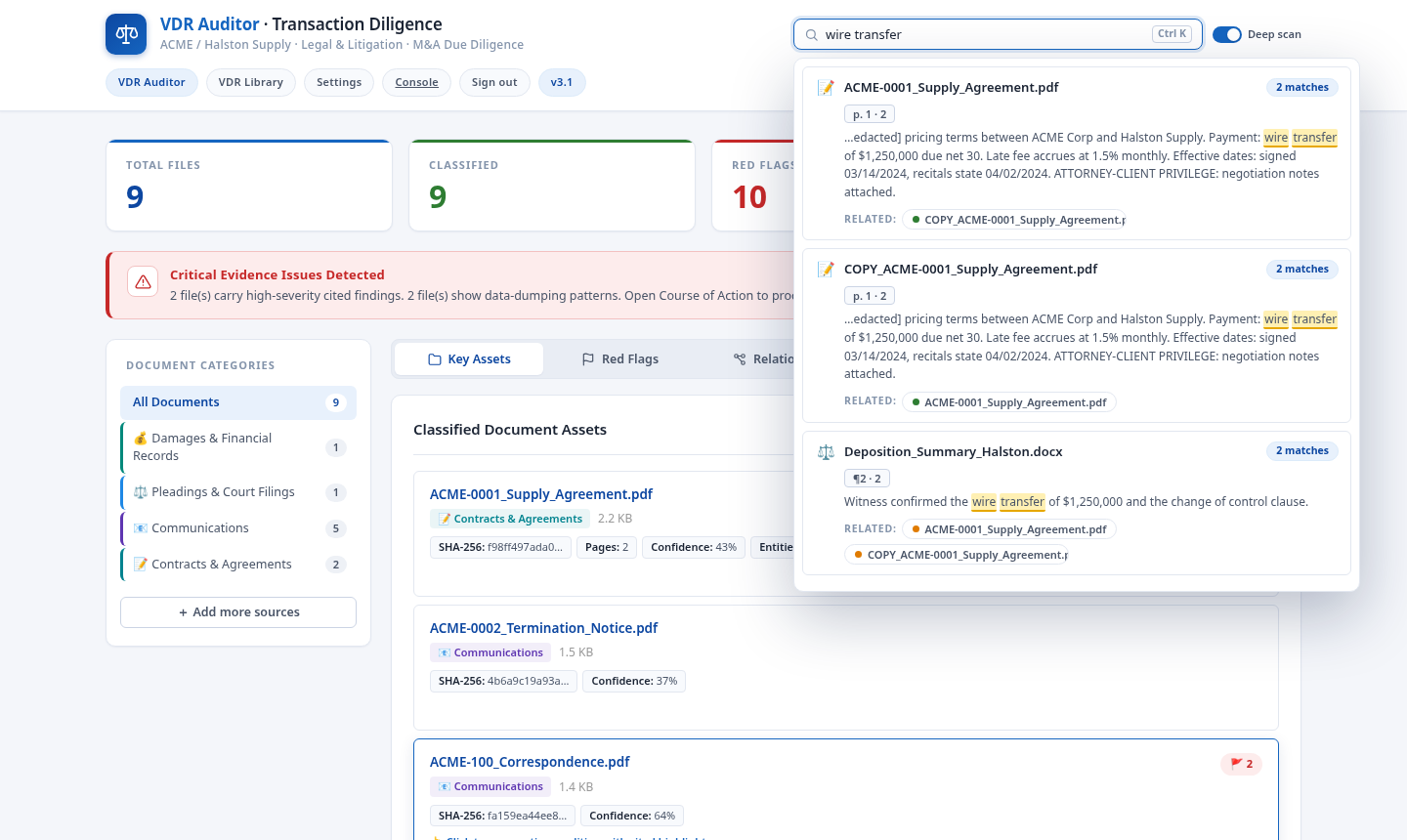
Deep scan contextual search
Full-text search inside every file, extracted text and OCR text alike, with per-page cited results, highlighted matches in the viewer, and related files sourced per result: context to context.
Finding receipts
Every finding carries a signed receipt naming the agent, task, evidence page and quote, file hash, and status, so each flag can be traced back to its exact basis.
Runtime receipts log
The Receipts tab classifies every intake action as ALLOW, SOFT, or HARD, each with its reason and file hash: the audit trail of what the engine did and why.
Workspace Boundary panel
Mode, industry pack, use cases, jurisdiction, and role capabilities, recorded as a client-side audit record of the governance scope the workspace runs under.
High-volume intake
Sustained throughput benchmarked at 57-59 files per second on standard office documents in our test harness, and workspaces validated at tens of thousands of files. Your numbers will vary with file mix and hardware; the live progress readout shows yours as it runs.
Case Story narrative discovery
Type the story of the matter in your own words. The engine extracts the claims inside it, aligns each one against every analyzed file, and returns page-cited passages that support or cut against it, with a contradiction matrix and one-click deliverables: chronology, deposition kit, and red-flag filing.
Case lens
The matter context feeds back into every view: red flags rank by relevance to your case with the reason on each match, relations merge in your named subjects and parties, and the file viewer highlights parties, subjects, dates, and narrative terms in place.
Relates across the repository
Name the subjects whose related content must all be found. Every file and passage touching them is surfaced with citations, and files touching two or more subjects are cross-related, so the record connects instead of sitting in folders.
Vault and Matters
A sealed inventory of every file with its SHA-256 seal and an exportable custody manifest, plus named matters: save an entire workspace and switch between matters in the same session without re-uploading or re-analyzing anything.
Durable per-account sessions
Your workspace survives browser reloads on the same machine and is scoped to your sign-in: each account keeps its own files, findings, matters, and receipts, during and between sessions, plus a Reset workspace control when the matter closes.
Two rules govern every workspace.

One about where the first pass happens. One about how you prove integrity.

The local first pass
Reading, OCR, de-duplication, and the findings pass run in your browser during initial review. Files are audited, organized, and sealed before they go anywhere, and you decide what leaves your browser, when, and for whom.
Local OCR and extractionDe-duplication by hashNo upload during first passNo model training on your data
Proof you can check
Every file carries a SHA-256 seal from the moment it enters the workspace. Seals are printed in the report appendix and can be re-verified at any time, so the chain of custody is a record, not a promise.
SHA-256 sealsRe-verify any fileChain-of-custody exportDraft and Proof report modesPatent pending
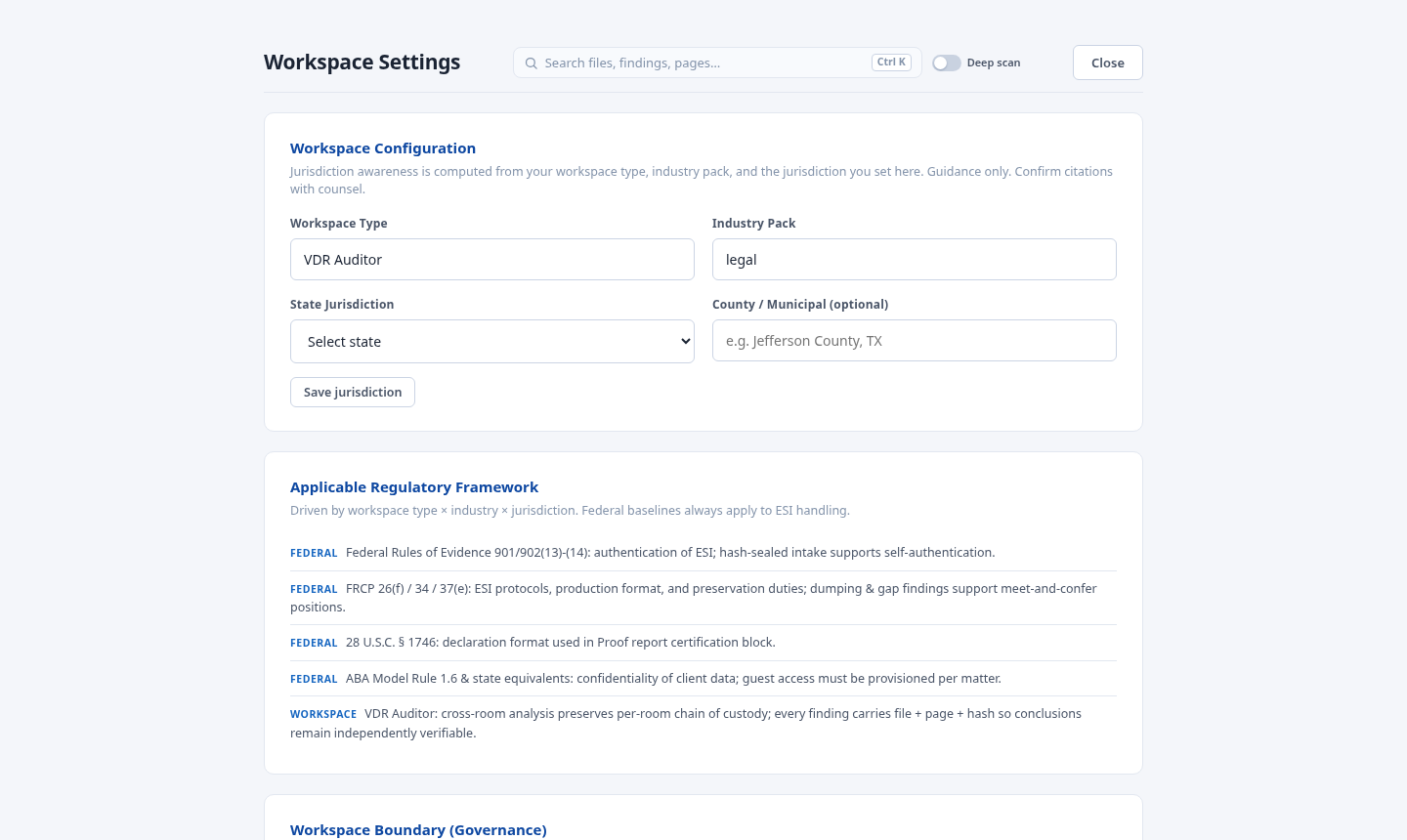
Workspace Boundary settings panel recording mode, industry pack, jurisdiction, and role capabilities
Jurisdiction-aware regulatory framework and workspace boundary in Settings.

Two plans. One engine. No per-page meters.

Both plans run the same engine. The difference is the job they are built for. Allowances follow the plan tier: Essentials, Flex, or Custom, sized by retained workspace storage and file count. Pricing is predictable and agreed up front, scoped to your transaction, never priced per page.

VDR Auditor
Autonomous diligence across one or many data rooms and local repositories on the same transaction.
  • Complete diligence audit across rooms and repositories
  • Cited red flags with page-level evidence and quoted passages
  • Cross-room analysis across rooms and repositories on the same transaction
  • Draft and Proof report modes with an evidentiary index
Sign up free
VDR Vault
A secure, hash-sealed repository for deal documents, with role-based permissioning for your review team.
  • Hash-sealed intake of entire rooms, folders, and ZIPs
  • Role-based access across five roles, with jurisdiction-aware references
  • Global search with full-text deep scan and related-file context
  • Chain of custody from intake to export
Sign up free

Sign up.

Start your 14-day free trial. No credit card required. Your workspace, findings, and settings are saved and waiting when you return. Nothing is shared between workspaces.

What a workspace holds
SavedFindings with their evidence snippets, index state, seals, role settings, and intake records.
Not savedFiles you only reviewed locally. Re-import the source folder to restore full text.
PortableExport your workspace as JSON, or delete it outright, from the account page.

One engine, tuned to your industry.

Pick an industry pack at onboarding and the workspace inherits its categories, red-flag rules, regulatory references, and diligence vocabulary.

Use cases by transaction type

Built different. Built secure. Built for velocity.

Most deal tools fall into two camps: legacy rooms built for a slower era, and lightweight trackers built for decks, not diligence. Here is how the categories compare.

CapabilityVDRProsLegacy VDR platformsLightweight sharing tools
Pricing modelPredictable, agreed up front, never per pageOften quote-based, with per-page, storage, or overage components that can be hard to predictOften per-user subscription tiers; costs can expand as reviewer counts grow
First pass on sensitive filesLocal browser processing for initial OCR, review, and organization before any sharing stepTypically cloud-first: files are uploaded before meaningful reviewTypically cloud-first: files are uploaded before meaningful review
Document integritySHA-256 seal per file at intake, printed in the report appendix, re-verifiableIntegrity controls and audit logging vary by vendor and tierLink controls and analytics vary by plan
Diligence depthEvidentiary index, cited red flags, and drafted reportsOften strong workflow tooling, with setup that can be implementation-heavyUsually strongest at view tracking, not deep transaction diligence
SetupSelf-serve, browser-nativeOften sales-assisted onboardingFast link sharing, but limited structure for full diligence
Deep scan search

Full-text search inside every file, extracted text and OCR text alike, with per-page cited results and related files sourced per result.

Vendor capabilities change and vary by tier. This table describes category patterns, not any single vendor.

Deep scan results with matches highlighted in context and related files listed per result
Deep scan highlights every match in context with related files.

Straight answers

Do our files leave our machine during the first pass?

No. During initial review, reading, hashing, OCR, classification, and the findings pass all run locally in your browser. You choose what leaves your browser afterward. The exact data flows are documented in our security disclosures.

How does pricing work?

Predictably. Engagements are scoped to your transaction and agreed up front, never priced per page. If scope grows late in the process, changes are re-agreed with you before they affect price, not metered into a surprise invoice.

Can outside counsel, auditors, lenders, and buyer teams access the room?

Inside your workspace, role-based access covers five roles with granular permissions, so your deal team, counsel, and advisors each see exactly what they should. A hosted room for outside parties is on the roadmap; today, reports, indexes, and seal appendices export for controlled sharing with external stakeholders.

What happens to files it cannot classify?

They go to quarantine, and the count shows on the report. A document filed on a weak guess is worse than one held for triage, so the threshold fails closed. The inspector shows the score behind every placement.

What is the difference between VDR Auditor and VDR Vault?

Auditor is the diligence engine: it reads across rooms and repositories and produces cited findings and reports. Vault is the secure repository: hash-sealed storage, permissioning, and chain of custody. Both run on the same engine.

Does the report replace professional judgment?

No. It replaces the first pass: the reading, sorting, and defect-hunting that eats the most hours and produces the least judgment. Reports stay in Draft mode until you finalize them, and every finding quotes its source passage so you can check it instead of trusting it.

VDRPros drafts findings for professional review. Verify every action before you rely on it. Nothing on this page is legal advice.

How it worksEvidenceIndustriesCompareSecurityPricingFAQSign up © 2026 VDRPros. Nothing on this page is legal advice.